

Beta: Credential Monitoring is currently in beta. We’re continuously expanding monitoring methods and adding new features to enhance your security posture.
What is Credential Monitoring?
Compromised credentials are one of the weakest security points and the easiest attack vector for cybercriminals. ProjectDiscovery’s Credential Monitoring is a continuous threat intelligence system that detects compromised credentials from malware stealer logs, enabling security teams to prevent account takeovers. By continuously scanning millions of exposed credentials, the platform identifies actual credential exposures that pose immediate risk to your organization, employees, and customers. We specifically focus on malware stealer logs as these have proven to be the most impactful security vulnerabilities. As we evolve this beta product, we’ll be expanding monitoring across GitHub repositories, crawled web pages, and other sources to detect exposed tokens, API keys, and environment secrets.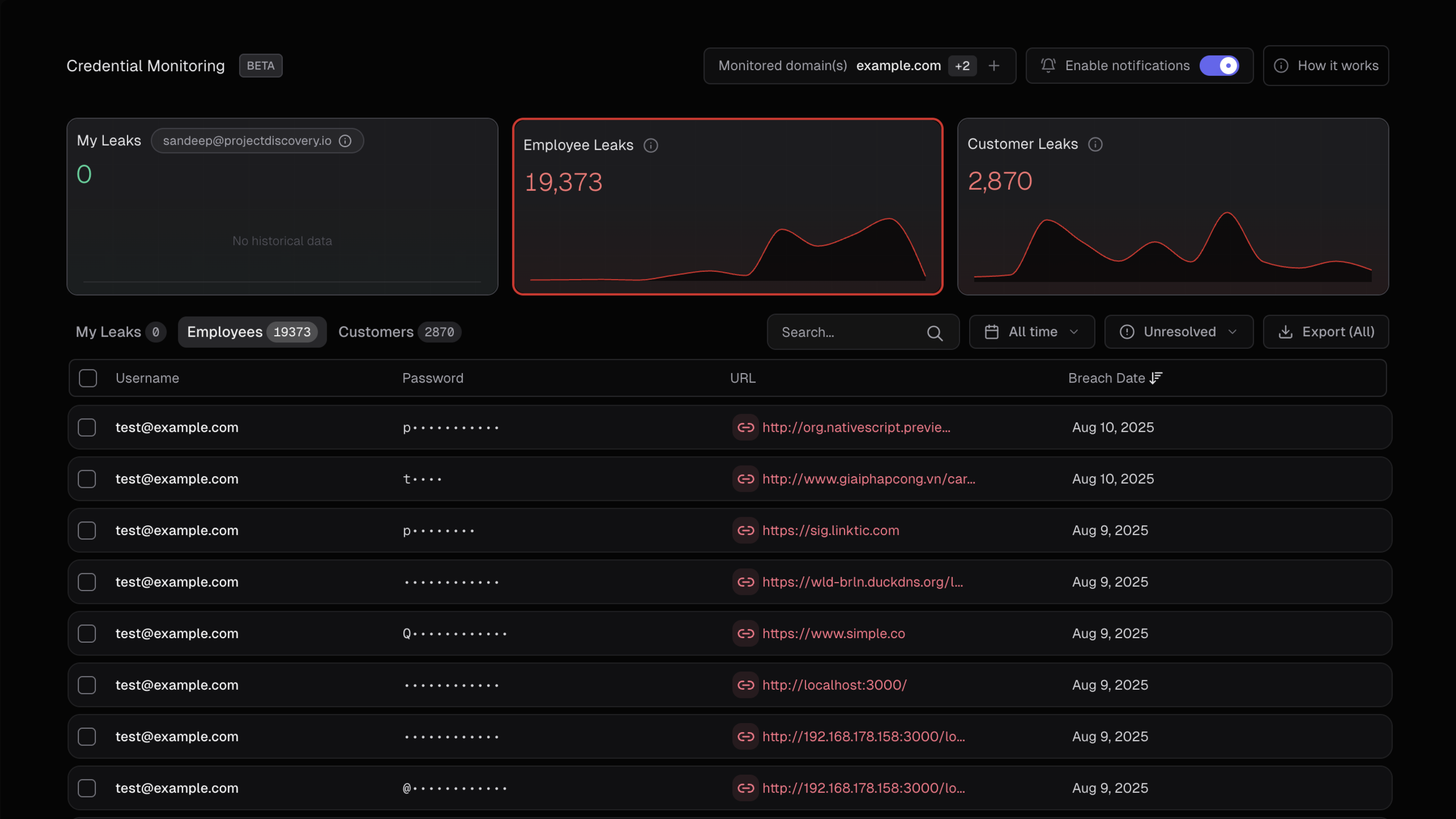
Try Credential Monitoring Now
Start monitoring your credentials for free and see exposed credentials in real time.
Feature access by plan
Domain Verification
Required for Organization-Wide Leaks: To access Employee Leaks and Customer/User Leaks for your organization, you must first verify ownership of your domain.
How to Verify in the App
1
Navigate to Credential Monitoring
Go to cloud.projectdiscovery.io → Credential Monitoring → Domains → Add Domain
2
Enter your domain
Type your domain name and click Continue
3
Choose verification method
Select your preferred method tab (DNS record / HTML meta tag / Upload TXT file) and follow the instructions. Use the built-in copy and download helpers.
4
Complete verification
After adding the record, meta tag, or file, click Verify. A successful verification marks the domain as Verified ✓
Verification Methods
Choose from three verification methods based on your access level:DNS TXT Record
Best when you have DNS access
HTML Meta Tag
Best when you can edit your website
Upload TXT File
Best when you can upload files to your site
Method 1: DNS TXT Record
Recommended — Standard method when you have access to edit DNS records for the domain.
1
Create a TXT record
Add a TXT record on the root of your domain with the following value:
2
Configure DNS settings
3
Verify in the app
Click Verify in Credential Monitoring. Once successful, your domain will show as Verified.
Troubleshooting DNS Verification
Troubleshooting DNS Verification
- DNS propagation can take up to 48 hours, though most verifications succeed within minutes
- Verify your record is live using terminal:
Method 2: HTML Meta Tag
Best when you can edit and deploy your site’s HTML but cannot change DNS settings.
1
Add the meta tag
Place this meta tag inside the
<head> section of your root HTML page (https://yourdomain/):2
Deploy the change
Push the updated HTML to your live site.
3
Verify in the app
Click Verify in Credential Monitoring.
Troubleshooting HTML Verification
Troubleshooting HTML Verification
Confirm the tag is present in the deployed page:If verification fails:
- Ensure the change is on the live site (not staging)
- Clear any CDN/cache that might be serving an old version
Method 3: Upload TXT File
Best when you can upload static files to your site root but don’t want to modify DNS or HTML.
1
Create the verification file
Create a file named
pd-verification.txt containing only your verification string:2
Upload to your site root
Upload the file so it’s accessible at
https://yourdomain/pd-verification.txt3
Verify in the app
Click Verify in Credential Monitoring.
Troubleshooting File Verification
Troubleshooting File Verification
Confirm the file is reachable and contains the expected string:If verification fails:
- Ensure the file is served over HTTPS
- Verify it’s accessible at the exact root path
Quick Troubleshooting Reference
FAQs About Verification
Do I need to verify to see personal leaks?
Do I need to verify to see personal leaks?
No — personal leaks are automatically visible for the email you used to sign up. Verification is only required for organization-wide views.
Can I verify multiple domains?
Can I verify multiple domains?
Only Enterprise customers can have multiple domains verified. You can self-verify each domain individually or reach out to support for bulk verification.
How long does verification take?
How long does verification take?
Usually 5–10 minutes, depending on DNS propagation time.
Do I need to reverify later?
Do I need to reverify later?
No, once a domain is verified it remains linked unless the verification record is removed.
How It Works
Our credential monitoring system:-
Collects malware-stolen credential data from publicly accessible sources including:
- Telegram channels and groups where malware logs are shared
- Leaks forums and websites
- Public repositories where malware logs are posted
-
Processes and filters the data to:
- Parse credential pairs (email:password combinations) from malware logs
- Extract domain and email information
- Filter for credentials matching your monitored domains
- Remove invalid formatted data
- Alerts your team when credentials matching your monitored domains are found
Important: ProjectDiscovery does not validate, test, or attempt to login with any collected credential information. We only collect and filter the data for formatting validity - we do not verify if credentials are active or functional.
Leak Classification and Mapping
ProjectDiscovery’s Credential Monitoring categorizes discovered credentials into three distinct types based on their relationship to your organization. Understanding these categories helps prioritize remediation efforts and assess security impact across different stakeholder groups.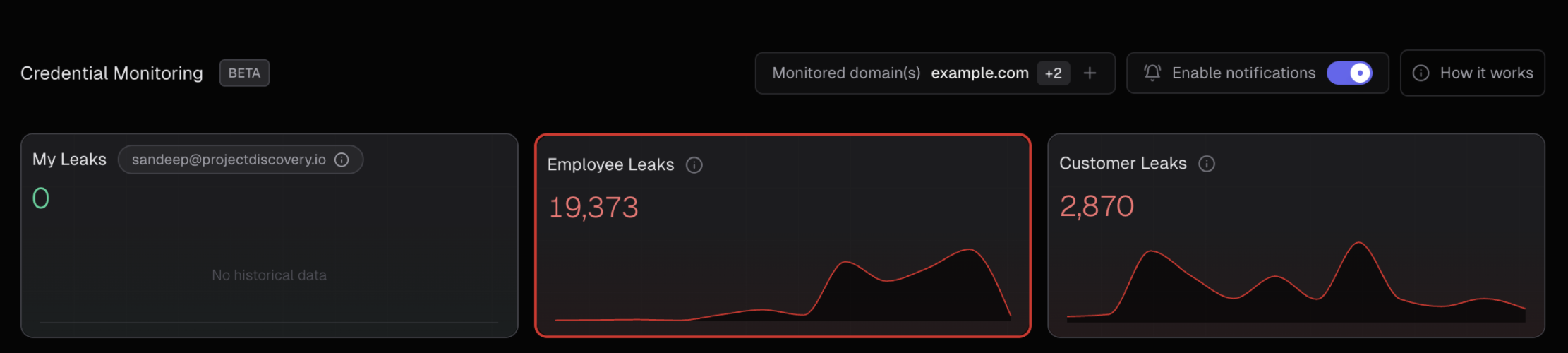
Visual Data Flow
The following diagram illustrates how credential data flows through our classification system:Leak Categories Explained
👤 My Leaks
Personal Account Exposures- Definition: All credential exposures directly associated with your logged-in email address in the ProjectDiscovery platform
- Scope: Personal accounts and services where you used your email for registration
- Impact: Direct personal security risk requiring immediate attention
- Example: If you’re logged in as
admin@hooli.com, this shows all malware logs containingadmin@hooli.comcredentials - Access: Available to all user tiers without additional verification
👥 Employee Leaks
Organizational Workforce Exposures- Definition: All credential exposures where the login email contains your organization’s domain, regardless of the service/platform where it was used
- Scope: Current and former employees using company email addresses on ANY platform or service
- Impact: Internal security risk affecting both organizational assets and external vendor access
- Examples:
- Internal Company Services:
john.doe@hooli.com→mail.hooli.com(company email)sarah.smith@hooli.com→intranet.hooli.com(internal systems)
- External/3rd Party Services:
john.doe@hooli.com→github.com(code repositories)sarah.smith@hooli.com→aws.amazon.com(cloud services)support@hooli.com→slack.com(communication tools)admin@hooli.com→dropbox.com(file sharing)
- Internal Company Services:
- Access: Requires domain verification for Business Domain Users; automatically available for Enterprise users
- Privacy: Only visible to Owner and Admin account types
🏢 Customer/User Leaks
External Customer Exposures- Definition: All credential exposures where the login URL/domain contains your company domain, but the email address does NOT belong to employees
- Scope: Your customers and users who have accounts on your services or platforms
- Impact: External customer security risk affecting user trust and platform security
- Examples:
user123@gmail.comwith login URL containinghooli.comcustomer@yahoo.comaccessing services atapp.hooli.combuyer@outlook.comwith stored passwords forshop.hooli.com
- Exclusions: Does not include employee emails (those are classified as Employee Leaks)
- Access: Available to verified Business Domain Users and Enterprise customers
Key Classification Distinction
Critical Understanding: The fundamental difference between Employee and Customer leaks:
-
👥 Employee Leaks: Determined by the EMAIL ADDRESS - any leak where the email contains your company domain, regardless of what service it was used on
john@hooli.comused on GitHub ✓ Employee Leaksarah@hooli.comused on AWS ✓ Employee Leakadmin@hooli.comused on Dropbox ✓ Employee Leak
-
🏢 Customer Leaks: Determined by the SERVICE/LOGIN URL - any leak where external emails were used on your company’s services
user@gmail.comused onapp.hooli.com✓ Customer Leakcustomer@yahoo.comused onshop.hooli.com✓ Customer Leak
Priority Matrix for Remediation
Data Accuracy and Classification Logic
Our classification system uses advanced pattern matching and domain analysis to ensure accurate categorization:- Email Domain Matching: Sophisticated regex patterns identify company domains in email addresses
- URL Domain Extraction: Advanced parsing extracts target domains from login URLs and service endpoints
- Duplicate Prevention: Cross-category filtering ensures employee emails don’t appear in customer leak categories
- False Positive Reduction: Multiple validation layers minimize misclassification
Understanding Malware-Based Credential Theft
How Malware Steals Credentials
Malware (information stealers) typically harvest credentials from:- Browser saved passwords - Chrome, Firefox, Edge, Safari stored passwords
- Application credentials - Email clients, FTP clients, messaging apps
- System credential stores - Windows Credential Manager, macOS Keychain
- Browser cookies and sessions - Active login sessions
- Cryptocurrency wallets - Wallet files and recovery phrases
- SSH/RDP credentials - Stored connection credentials
Malware Log Structure
When malware infects a system, it creates “logs” containing stolen data that may include:- Victim’s system information (OS, location, etc.)
- Stolen passwords organized by application/browser
- Cookies and session tokens
- Cryptocurrency wallet data
- Screenshots and system files
Why Some Findings Lack Detailed Metadata
Important: Not all credential exposures include complete metadata such as specific malware names, infection dates, or victim details. This happens because:
- Data Processing: Threat actors often strip identifying information before sharing logs
- Source Aggregation: Logs may pass through multiple hands before becoming publicly available
- Privacy Protection: Some sources anonymize victim information
- Technical Limitations: Malware logs don’t always contain complete metadata
Common Metadata Available
When present, malware logs may include:- Collection date - When the malware harvested the credentials
- Geographic location - Country/region of infected system
- System information - OS version, browser versions
- Malware family - Type of stealer malware used (when identifiable)
When Metadata is Missing or “Blank”
If findings show blank or missing source information:- The credentials are still valid threats - treat them seriously
- Source anonymization - Information may have been stripped for privacy
- Multiple aggregation - Logs may have passed through several sources
- Technical parsing issues - Some log formats don’t parse completely
What Actions Should You Take?
When malware-exposed credentials are identified for your domain:Recommended Actions
- Force password resets for all affected email addresses
- Enable multi-factor authentication (MFA) on all affected accounts
- Disable compromised accounts temporarily and review recent activity
- Rotate associated API keys and service account passwords
- Scan endpoints for malware infections
- Deploy endpoint protection and implement password managers
- Conduct security training to prevent future credential theft
Handling Cases with Missing Source Details
When leak sources are blank or incomplete:- Prioritize these equally - assume they represent active threats
- Focus on remediation rather than source investigation
- Monitor affected accounts closely for suspicious activity
- Treat as confirmed malware exposure and follow full remediation steps
API Integration
Access credential monitoring data programmatically:- Export Leaks:
POST /v1/leaks/export- Export all leaked credentials (personal, employee, customer) with filtering options - Leak Details:
POST /v1/leaks/info- Get detailed information for a specific leak - Update Status:
POST /v1/leaks/status- Mark leaks as fixed or reopen them - Domain Stats:
GET /v1/leaks/stats/domain- Get leak statistics for any domain (public endpoint, no auth required) - Email Stats:
GET /v1/leaks/stats/email- Get leak statistics for any email (public endpoint, no auth required)